In addition to the DiskSavvy client GUI application and the command line utility, DiskSavvy Enterprise provides a web-based management
interface allowing one to control one or more servers using a regular web browser locally or via the network. The web-based
management interface allows one to perform disk space analysis operations, save various types of reports, perform disk space usage
history trend analysis operations and schedule periodic disk space analysis operations.
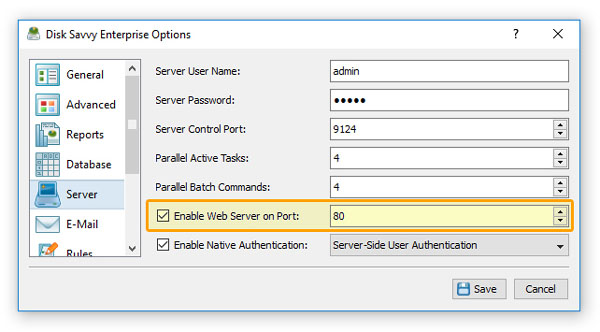
By default, the web-based management interface is disabled and in order to enable the web-based management interface, open the DiskSavvy
client GUI application, connect to a server, open the 'Options' dialog, select the 'Server' tab, select the 'Enable Web Server'
option and press the 'Save' button.

In order to connect to the DiskSavvy Enterprise web-based management interface, open a regular web browser, type the host name or an IP address
of the server to connect to and login to the DiskSavvy Enterprise using the default (admin/admin) user name and password.